24 January 2022

Frank Ernst Graf WWI Draft Registration


 Source: "World War I Draft Registration Cards, 1917-1918," [database on-line], Ancestry.com (www.ancestry.com : accessed 25 June 2021), Entry for Frank Ernest Graf Number 337; United States, Selective Service System. World War I Selective Service System Draft Registration Cards, 1917-1918. Washington, D.C.: National Archives and Records Administration. M1509, 4,582 rolls. Imaged from Family History Library microfilm.

My great uncle, Frank Ernest Graf, was 25 years old when he filled out his World War I draft registration. Frank was the son of Valentine Graf and Nancy Mast. The information on his draft registration was substantiated by my research, with one exception, the number of children.


He was born 13 August 1891 in Kokomo, Howard, Indiana, United States. He was one of seven children who lived to adulthood. The family left Indiana and moved to Brethren Michigan around 1900.


In 1917, his occupation was a Carpenter in Pontiac, Michigan. He had a wife and three children at this time. If he signed the draft registration 5 June 1917, he had four children: Beulah, Garl, Richard, and Donald. Donald was born 2 May 1917. He may have forgotten about his six-week-old baby.


Frank Ernest Graf wasn’t drafted.

23 January 2022

The Michigan Death Certificates, 1921-1946 Are Now Available

Downloaded version of Michigan Death Certificates, 1921-1946 for August Fredrick, my great grandfather.  Found at michiganology.org

The Archives of Michigan has been working on getting the Michigan Death Certificates, 1921-1946 added and searchable to their Michiganology.  2022 was the first year that the back end of the website did what it was supposed to do-add the new year automatically.

Currently, the death certificates cover the years 1921-1946.  Each January another year will be added until all, up to 1952, death certificates are online.  An index through 1952 is available. Those 1947-1952 death certificates are accessible at the county clerks office.

To access the records: Go to Michiganology>Research>Vital Records.

I appreciate being able to access these images of the death certificates. The best part is that they are FREE! 

If you have ancestors who died in Michigan, check the death certificates at Michiganology. 


This post was updated on 22 January 2022 editing information that was previously at Seeking Michigan.

22 January 2022

I'm Working On It-Broken Links


I have a new appreciation for Cyndi of Cyndi's List and what she has to do to keep her links current. I updated my blog template last night and today I decided I should check for broken links. I don't remember the last time I did this.

Broken Links at Journey to the Past

I used Broken Link Check, a free, up to 3000 pages, broken link checker. I have 175 broken links! I'm sorry, readers. I knew I had a bunch of links that were linked to Seeking Michigan when they converted to the Michiganology website. Also, the Archives of Michigan and the Library of Michigan have reworked their websites, more broken links. I have a bunch that linked to Family Search, more broken links. The link checker also showed a number of broken links from comments and commenter profiles. I am not concerned with those right now.

What has changed at Journey to the Past?

If you bookmarked certain pages of my blog and you cannot find them or are getting the dreaded "404 not found message", don't worry. I reverted some of the pages to draft. That way I can work on updating those pages. I reverted my Michigan Genealogy series of blog posts to draft. There were so many broken links on those posts, I decided I need to update the whole post. 

This weekend was a good weekend to work on my blog. The wind chill has been in the single digits in Kalamazoo this weekend. It is too cold for me to want to go outside, but a good time to work on my blog.

I hope to get the Michigan Genealogy series up this week. I will continue to work on broken links as I have time. If you write a blog, do you keep your links up to date? How often do you look for broken links? Do you go back to the first years of your blog and correct them? I would like to hear from other bloggers on how they handle broken links in their blog.

Normally, I would update my broken links a couple of times of year. I work on the most recent posts with broken links and work backwards. The link checker sorts them that way. 

I think once I get the posts edited and updated, my blog should be good for awhile. I have only gotten one complaint about broken links. It was someone who was not happy about the Michigan Genealogy broken links. Hopefully, these updates will help.

21 January 2022

New Look for 2022


Credit: Creative Commons Non Commercial Share Alike 
2.0 Generic (CC-BY-NC-SA 2.0) from flickr


There is a saying in Michigan. Michigan has two seasons-Winter and orange barrel construction season. I decided it was time to do a little 'construction' on my blog. Gone is the scooter and dark background and in its place is a lighter, fresher template.

I felt my blog theme was dated and I needed to do some updating. Plus, I was starting to have formating issues. The content is the same I just moved things on the sidebar around. The blog post area is wider and can accomodate larger pictures, no more lapping into the side bar area. Another change is with the pages under the title at the top. I was limited on my other template to the number of pages, but with this template I can add more. 

I will  be tweaking it this weekend as I go through each section. If you have any suggestions for improvement, please leave a comment. I want to make sure it is accessible to all my readers.


19 January 2022

Tips for Beginning Genealogy-Part Two

Credit: Pixabay, no attribution needed


Tips for Beginning Genealogy-Part One showed you how to gather your information, talk with your relatives, record what you found, organize your research, and what is a wiki.


I have a few more tips for you and then we get to the fun part of finding the records.


Tip #1: Be consistent. Hopefully, you have found a family group sheet that you are using. Be consistent when filling these group sheets out.


  • Record dates in the day, month, year format. For example, 16 January 2022.
  • Use abbreviations consistently. For example: St. for Street, Ave. for Avenue. You can write the words out, but just do it the same way each and every time.
  • Places are recorded from small to large entities. Include town or city, county, state, country. For example: Kalamazoo, Kalamazoo, Michigan, United States, Methil, Fife, Scotland, United Kingdom
Tip #2: Decide what you want to learn about your family. Who do you want to know more about? What do you want to learn about that person? Focus on one person or one family at a time. You will be tempted to research multiple people at the same time. Try to resist this temptation.

Tip #3: Set a goal. I can hear your groans; you wonder if we are ever going to get to research. Trust me all this prep work will make it easier when you start looking for resources.

Focus on a single task. Beginning Genealogy examples include:
  • Finding the parent's names
  • Finding an individual's birth date or place
  • Finding a marriage date or place
  • Finding a death date or place
  • Finding a spouse/partner name or birth name
  • Finding the name of siblings
Tip #4: Identify what records will help you find what you need. You may be tempted to look for birth records first, but I like to look at death records. Death records will give you clues to the other facts.
  • Death records are the most recent record, but you will need to know the state to find the record. It may not be the same place as the burial. Death records are more available than birth records. Look for death records at the county or state level. In New England, look at the town level. If you can't find the death certificate, check for obituaries, cemeteries, family bibles, social security index, or church records. 
  • Marriage records can be found at the town or county level, family bibles, newspapers, church records or for very early marriages check the state archives.
  • Birth record access may be limited. Many states have closed birth records for one hundred years or more. If you can access a birth certificate, wonderful. If you can't look for family bibles, death records, marriage records, census records, church records, military records and probate records.
In addition to death, marriage, and birth records, beginners should look for census records and obituaries. When using census records start with the most recent one that your ancestor is in and work backwards. The most recent census for the United States is 1940. The 1950 U.S. Census will be released in April, but it will take some time for it to be transcribed.

Use the Family Search Research Wiki to see what census records are available. Census records are easy to find on the internet. The example below is for Michigan. 


Tip #5: Find the record. Finally, you get to look for the records! Depending on what type of record you need will determine where to look for it. Archives, libraries, courthouses, email, internet, original record holder, genealogical and historical societies, and government offices are all places where records can be found. Everything is not online.

Records can be found online at a variety of websites. I will share a few of my favorites. They are in no order except I would start with the free records on Family Search. All websites are free.

Family Search-You already know about the research wiki. If you want to search for a specific record that is available on Family Search or you want to enter your ancestor's name in a search, start at FamilySearch.org home page. Register for a free account to get the most from the website. Next click on "Search", a drop-down box will appear, select "Records".

From the records page you can read about "Tips for Effective Searching". Search by name, find a collection, or browse all collections, and search by place are other options.

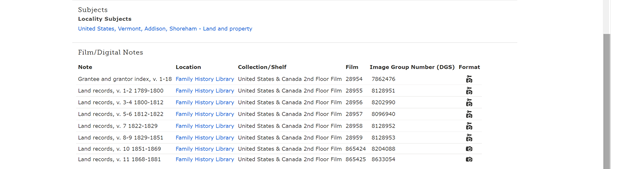
One thing to note about Family Search records is that not all records are available from your home or library computers. If you see the camera with a lock above it, you will have to go to a Family History Center to view the record. The reason for this has to do with the permissions obtained by Family Search.


Find a Grave-has millions of gravestones on its website. You can search for individuals and cemeteries. In addition to viewing memorials, you can upload your photos, request pictures, and fulfill requests.

U.S. Gen Web- holds records from every state and most counties. Click on the main page map for the state you are researching. This award-winning website needs to be explored. You never know what you will find. 

Google-is more than a search engine. I use google programs such as maps, YouTube, translate, books, and Google Earth. Lisa Louise Cooke is the Google goddess. Check her Genealogy Gems website for tips on using the various google products. 

Olive Tree Genealogy- is for United States and Canada researchers. Check out the Help for Beginners page. Olive Tree Genealogy is strong in Immigration and Passenger Lists and Canadian Genealogy. Additional records for New York, Native Americans, Military and more are found here.

Cyndi's List-is a must visit website when starting your online research. It isn't a database, but thousands of links that directs you to online resources. Did you want to know more about New Mexico? There's a page for that? Do you want to dig into military records? Cyndi's List will have the links that take you to those. If Cyndi doesn't have a link to it, it probably isn't online.

Chronicling America-you will want to do newspaper research and this Library of Congress website is a great starting place. First, it's free! Plus, it's has a searchable database for historic United States newspapers.

Internet Archive-billions, yes billions of web pages and millions of books and texts are available for researchers to view. It's a digital library. In addition to books and texts it has audio recordings, images, and videos.

Facebook-you may be surprised I included a social media site for you to use, but Facebook is a great place to get current information about a variety of things. Most libraries, archives, and societies have a presence on Facebook. There are thousands of groups and pages having to do with genealogy.  There are thousands of people willing to help you with any questions you have. Check out the Genealogy on Facebook list. This one is for the United States but there is one for Canada and Australia.

Access Genealogy-is a great place to go for Native American genealogy. Additional strengths include census records, cemetery records, military records, and more. 

A few closing thoughts.
  • Remember where you found the information. Cite Your Sources.
  • Verify records by finding the original, especially if it is an index.
  • Analyze what you find. Check dates to make sure you have the right record at the right time. A child cannot be born years after the mother's death.
  • Online sources are not error free.
  • Consider the reputation of the source. You will learn this the more you research. The websites I have provided are reputable ones. Be careful of online trees, they contain errors. 
  • and just because it is online doesn't mean it's true!

Don't be afraid to make a mistake. I have made plenty. Once I researched a person who I thought was my great grandfather only to discover the one I researched died in Iowa. My ancestor died in Michigan. Once I had to research seven men with the same name to get to the one man in my family.

Lastly, enjoy the journey. It is a wonderful, rewarding hobby. One where you disturb the dead and irritate the living!


17 January 2022

Tombstone Tuesday: Caroline C. Glover


 Oct 31, 1833

The above tombstone is for Caroline C. Glover, daughter of Charles Williamson Glover and Mary Ann (Powers) Glover. The stone is more than half buried with dirt and grass. Because of the age of the stone I did not try to expose it.

Caroline C. Glover was born 31 Oct 1833, possibly Ypsilanti, Washtenaw, Michigan, United States. She was a twin to Charles Williamson Glover, Jr.

Caroline died in Detroit, Wayne, Michigan, United States on 15 Oct 1893 at the age of 59.  She never married. The cause of death was cancer of the heart. 

Caroline is buried in Lot 21 Block 100 at Highland Cemetery, Ypsilanti, Michigan, United States.

Caroline's Find a Grave Memorial is Number 138488227.

Tips for Beginning Genealogists-Part One


January is a time when people want to learn more about their family history. Is it the follow up from the holidays? or did someone get a DNA kit and got curious? or is it you are stuck inside, in the northern climates, and need something to do? or you saw an ancestry.com commercial and think I could do that.


Whatever your reason for starting to do family research remember we were all beginners at one time. I have noticed, on social media, that people have been asking questions about how to get started with researching their family. The fact that someone is asking how to start is a good thing and not one that needs to be answered with "google it." 


There are so many things I wish I had known when I started researching. I started researching just as records were being digitized and added online. Research needs to be done online and in person. It is not all online. You will still need to go to record repositories, archives, libraries, historical societies, etc. I thought I would share a few of the tips I have found that are good for beginners. 


Tip #1: Turn off the computer. Yes, I did say turn off the computer. Beginners should scour their home and their parents and/or grandparents’ home for records that are in the family. Look for birth, marriage, and death records, obituaries, holy cards, family bibles, and more. Ask questions: who has the family records, pictures, bible, etc. If you do this at the beginning it will save you time overall. You won't need to search newspapers for Great Grandpa Smith's obituary if someone already has it. Or in my case, searching for Louise Fredrike Fredrich's birth name only to find my sister had it in a letter from an aunt. Okay, you can turn on your computer especially if you need to email a relative, ask a question on social media, or read about genealogy.


Tip #2: Organize as you go. This is one thing I wish I had done a better job with when I started out. Decide if you want to keep paper files, digital files, or a combination of both. I use a combination. I keep all official, certified copies as paper. These records would be things like birth certificates, marriage licenses, death certificates, military discharge papers, etc. The records I paid money for. I save all records I have found on the internet as digital. I purchased a portable scanner to take to repositories. If allowed, I scan the record and keep it as a digital file.


It is hard to tell you how to organize your research because it is a personal thing. What works for one person may not work for another. I use a color-coded file folder system and sort by married couple. Another researcher may want individual files. Another one might want to use binders. Whatever makes sense to you, use. If you don't have a clue how to organize your research, ask questions. Facebook has groups that are just for organization.


Another way to organize your research is by using genealogy software programs. Family Tree Magazine has an article that explains the options, their price,if any, the bells and whistles of each one, and more. 


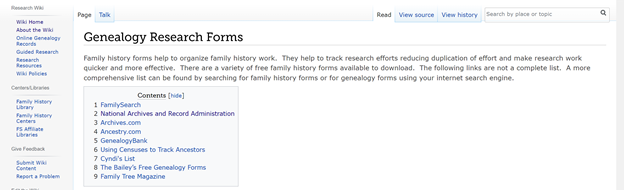
Tip #3: Use pre-printed forms. You can find forms for genealogy online at FamilySearch. https://www.familysearch.org/wiki/en/Genealogy_Research_Forms  The box at the top of the Family Search page shows nine links where you can find more forms.


There are two forms you should familarize yourself with when starting out, but keep this URL for future use. 


  1. Family Group Sheets: All family information is recorded on these. Enter as much information as you know and continue adding information as you find it. Don't forget to fill one out for yourself.  Fill one out for Parent One and Parent Two and their parents (your grandparents).
  2. Pedigree Charts: These charts show direct line ancestors, you, your parent(s), grandparents, great grandparents) Brothers, sisters, aunt or uncles are not shown on a pedigree chart. 

Write down where you got the record. Trust me, you won't remember after you have found your 25th obituary. Take the time to source your information as soon as you locate that first record. If it was in Grandma Jones's attic, write that down. Include her full name and address, especially if you have more than one Grandma Jones. Ask Grandma Jones where she got the item and record it as well. There is a separate form called "Source Summary" that may help you, but when first starting your journey I would suggest keeping the sources on your Family Group Sheet.


This is the time where you want to study how to source your information. You can view a webinar, or a You Tube video. You can read magazine articles at Family Tree Magazine or Internet Genealogy. There are books available on genealogy sources. One particularly good one is Elizabeth Shown Mills, Evidence Explained. It is pricy so see if your local library has a copy. You can read about sources at the Family Search wiki. You may know how to write source citations from school using the MLA or APA or Chicago Manual of Style. Whatever style works for you, use it. Write down as much information as you can about the item or record. 


Here are a few things to get you thinking about sources.

1.     Who is the author? (Individual, government agency) 


2.     What is the item title? (World War I draft registration card, History of Calhoun County, Michigan, 1940 U.S. Census)


3.    What type of record is it? (Birth certificate, family bible, grandma's wedding quilt, book, database)


4.    Where did you find it? You want to be able to find it again. Write down names and addresses if it was at someone's home, complete URL for websites, call numbers for library books and what library it was in, and write down the date that you found it.


As you become a better genealogist, you can learn how to write sources. Just start writing them. 


License: Creative Commons 3 - CC BY-SA 3.0

Attribution: Alpha Stock Images - http://alphastockimages.com/

Tip #4: Question, listen, and write down stories. There is no time like the present to listen to your family stories and ask questions of those relatives who are still here. I can't tell you how many times I wished I had written down my grandmother's stories. I would love to know what it was like to travel by wagon from Indiana to Northern Michigan at the turn of the 20th century. I wish I knew who my grandmother's grandmother was. You may find documents that don't correlate with the family stories but write them down anyway. You can glean clues from those stories and write factual stories as you find the correct information. You will get push back from your family because Aunt Jean is going to insist that she has a Native American princess in her family, and you are going to find out she doesn't.

 

Tip #5: Turn on your computer. Now is the time to start finding information on how to do genealogy, what records to look for, and who are my ancestors. I love the Family Search wiki. The wiki is a free guide full of resources. Resources include articles, websites, databases, records, and more all in one place.


 You can browse the wiki pages by places (country, states, provinces) or by content (sources, record groups, repositories). You won't find your ancestor's name at the wiki, but you will find how to find your ancestor's name.


I am going to slant this for United States research, but this will work for other countries, they just might not have states like the U.S. does. Start in the state that your parents or grandparents live. Enter the name of the state in the search area on the home page of the family search wiki. Look at the wiki for that state. For example, Michigan.


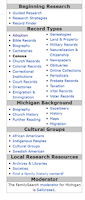
Each state is tailored to conducting research in that state. In the center of wiki page is basic information about the state, getting started with research, and Michigan research tools. Get to know when record keeping started. It is different for each state. You will notice colored buttons for "Michigan Online Genealogy Records" and "Ask the Michigan Community". 


The Michigan Online Genealogy Records sections shows what records can be found at Family Search. All records on Family Search are free to the user. Some records may have to be viewed at a Family History Center in your local area.


If you want to look for specific record groups, look at the box on the right sidebar. I will go into more detail in Part Two of my tips for Beginning Genealogists. The top of the sidebar has helpful topics for beginning genealogy. Be sure to read these.


Next, is the record type sections followed by background information for Michigan. 


Another section is on cultural groups followed by local research resources. Looking through all these sections will help you understand what is available for each state or area.


Beginning family history is a rewarding, exciting hobby. It is one you can do when you have a few minutes or a few hours. You will be tempted many times to collect names. Be careful with this approach. If you follow the above steps you will be setup for years of quality research.


You may have noticed that I didn't tell you where to look for records. I want you to develop a good understanding of what to do before you search for those. I will share more tips and my favorite websites for beginning your family history in my next blog post. I am happy to help beginning genealogists and feel free to email me brae957atgmail.com. Replace at with @.


Good luck and happy hunting!


Photo credits were included underneath the photos. Any photos without attribution were from Pixabay License, Free for commercial use, no attribution required.


All screenshots were taken from FamilySearch.org.


16 January 2022

Sunday's Obituary: Lola Mae Fredricks Brown

The cost of printing an obituary is getting more than the average person can afford. My dad had two obituaries. One, a short version, cost $170 to run in the local paper, in 2018. The second, a long version, was posted at the funeral home website for free. 


I look to funeral home obituaries more these days. Most funeral homes have an online presence. Funeral home obituaries may contain a colored picture of the person and the obituary. Additionally, many have areas to leave comments which can be viewed by the public.


Terwilliger Funeral Home, Kaleva, Michigan is the funeral home that has arranged a lot of my mother's family funerals. One of those funerals was for my Aunt Lola. Lola Mae Fredricks Brown was the second daughter of Otto August Fredricks and Daisy Ellen Graf.


Lola Mae Brown

(February 07, 1920-April 26, 2018)


Lola Mae (Fredricks) Brown, 98, of Brethren, died peacefully Thursday, April 26, 2018, at the Manistee County Medical Care Facility, in Manistee, with her family by her side.  She was born February 7, 1920, in Brethren, the daughter of Otto and Daisy (Fredricks) Graf.  (Note-it should be (Graf) Fredricks.)


Lola was a member of Trinity Lutheran Church, in Onekama, where she taught Sunday School and was active in Vacation Bible School. In her spare time, she loved to read, do puzzles, and crochet. Lola was a loving wife, mother, grandmother, and great-grandmother, and she will be remembered for her kind heart and sense of humor.


Lola is survived by her children, Bertha Asiala of Brethren, Faith Brown of Brethren, Walter (Janet) Brown Jr. of Onekama, and John (Sue Flater) Brown, Sr. of Manistee; ;her grandchildren, Mihael (Irene) Asiala of Pascagoula, Mississippi, Scott Asiala of Cadillac, Jennifer (Patrick) Bentley of Bear Lake, Renee Asiala of Brethren, John (Sarah) Brown Jr. of Bear Lake; great grandchildren, Madeline Asiala of Evart, Skylar Asiala of Cadillac, Hunter Bentley of Bear Lake, Sydney Bentley of Bear Lake, Colin Brown of Bear Lake, Nathan Brown of Bear Lake; several step-grandchildren and step-great-great- grandchildren; her siblings, Richard (Marilyn) Fredericks of Brethren, John (Louise) Fredricks of Blanchard, Audrey (Bruce) Glover of Portage, and Norma Jean (Leslie) Kaskinen of Central Lake; her sister-in-law, Alyce Fredricks; and numerous nieces, nephews, and cousins.


On June 10, 1945 at Trinity Lutheran Church, in Onekama, Lola married Walter F. Brown Sr. who preceded her in death. She was also preceded in death by: her siblings, Harold (Margaret) Fredricks, Daisy Marie (Walter) Kurth, Leona (Robert) Wagoner, Ray Fredricks, Norman Fredricks, Otto Robert (Faye) Fredricks, and Kathryn (Weiko) Tritten Pihl; and her son-in-law, Philip Asiala.


Funeral Services will be conducted at 3:00 PM, Sunday, April 29, 2018 at Trinity Lutheran Church, in Onekama, with the Reverend Timothy Selim officiating. Interment will follow in the Onekama Village Cemetery in Onekama. Visitation will be held from 2:00 PM until time of services at the church.


Memorial contributions may be made to Trinity Lutheran Church or to the American Heart Association.


The Terwilliger funeral Home, in Kaleva, is in charge of arrangements.